BeeHive
Build Better Teams. Work Together. Ship Faster.
Introduction
What is BeeHive?
BeeHive is a self-hostable, open-source collaboration platform designed to help organizations efficiently manage teams, projects, and workflows from a single unified workspace. It is ideal for startups, hackathon teams, freelance agencies, coding communities, educational groups, and other collaborative environments.
BeeHive is deployed and managed by an administrator for a specific organization or workspace. Each organization can self-host its own instance of BeeHive under its preferred domain or infrastructure, allowing complete control over data, customization, and deployment. For example, a startup can deploy BeeHive to manage its internal operations, while a hackathon team can deploy a separate instance for event collaboration. Although the platform remains the same, each deployment operates independently and is tailored to the needs of its respective organization.
Why BeeHive?
Managing a project is challenging, but managing multiple projects and teams simultaneously can quickly become overwhelming. As a project manager or team leader, it's essential to have clear visibility into every aspect of your organization's work. Questions such as How much of a project has been completed?, Who is assigned to each project or task?, and What is the current progress across all ongoing projects? become increasingly difficult to answer as the number of projects and team members grows.
In many organizations, project tracking, communication, documentation, and team management are spread across multiple tools. Constantly switching between these platforms reduces productivity, creates information silos, and makes it harder to maintain a clear overview of the organization's progress.
As teams expand, so does the diversity of skills and expertise within the organization. Team members continuously learn new technologies and develop new capabilities. Without a centralized system to track these skills, project managers often miss opportunities to assign the right people to the right tasks, limiting the team's overall efficiency and growth.
BeeHive addresses these challenges by providing a unified, self-hostable collaboration platform where organizations can manage projects, tasks, teams, and communication in one place. It offers real-time project tracking, structured team management, integrated collaboration, and complete visibility into organizational activities, enabling teams to stay organized, make informed decisions, and work more effectively together.
Features
BeeHive provides a comprehensive set of tools to help organizations manage projects, tasks, teams, and collaboration from a single platform.
Project Management
BeeHive enables administrators and project managers to create and assign projects to one or more team members while designating a project manager to oversee their execution. Each project can include a detailed description, deadlines, priority levels, and relevant reference links to provide clear objectives and improve communication.
To simplify project tracking, BeeHive allows projects to be divided into multiple components or milestones. Assigned members can mark these components as completed as they progress, giving project managers a real-time overview of the project's status and helping ensure that every stage of development is completed on schedule.
Task Management
In addition to managing large projects, BeeHive allows users to create individual tasks for smaller updates, bug fixes, feature requests, or maintenance work. Tasks can be assigned to specific team members, along with a description, deadline, and priority.
Once a task has been completed, the assigned member can mark it as complete, allowing managers to easily monitor progress and maintain an up-to-date record of ongoing work.
Real-Time Notifications
BeeHive keeps everyone informed through a real-time notification system. Users receive instant updates whenever meaningful activity occurs within the organization, including:
- Project progress and status updates
- Task assignments and completions
- New member registrations
- Approval of new users
- Team members adding new skills to their profiles
- Other important organizational activities
This ensures that managers and team members remain informed without the need for constant manual follow-ups.
Organization & Member Management
BeeHive provides administrators with complete control over their organization's workspace.
Administrators can review and approve or reject new user registration requests before granting access to the platform, ensuring that only authorized members can join the organization.
The platform also maintains detailed member profiles, allowing administrators to view information such as:
- Technical skills and expertise
- Assigned projects
- Assigned tasks
- Role within the organization
- Last active time
This centralized overview helps managers better understand the strengths of their team and assign work more effectively.
Community Collaboration
To encourage seamless communication, BeeHive includes a built-in Community Chat that allows team members to collaborate without relying on third-party messaging platforms.
The community chat supports:
- Real-time messaging
- Message replies
- Emoji reactions
- Image sharing
- Team-wide discussions
By bringing communication and project management together in a single platform, BeeHive helps organizations reduce context switching and maintain productive collaboration across their teams.
Getting Started
Installation
To get started with BeeHive, you'll need to set up the environment and install dependencies.
Architecture
System Overview
Database
Authentication
Real-Time System
Admin Guide
Dashboard
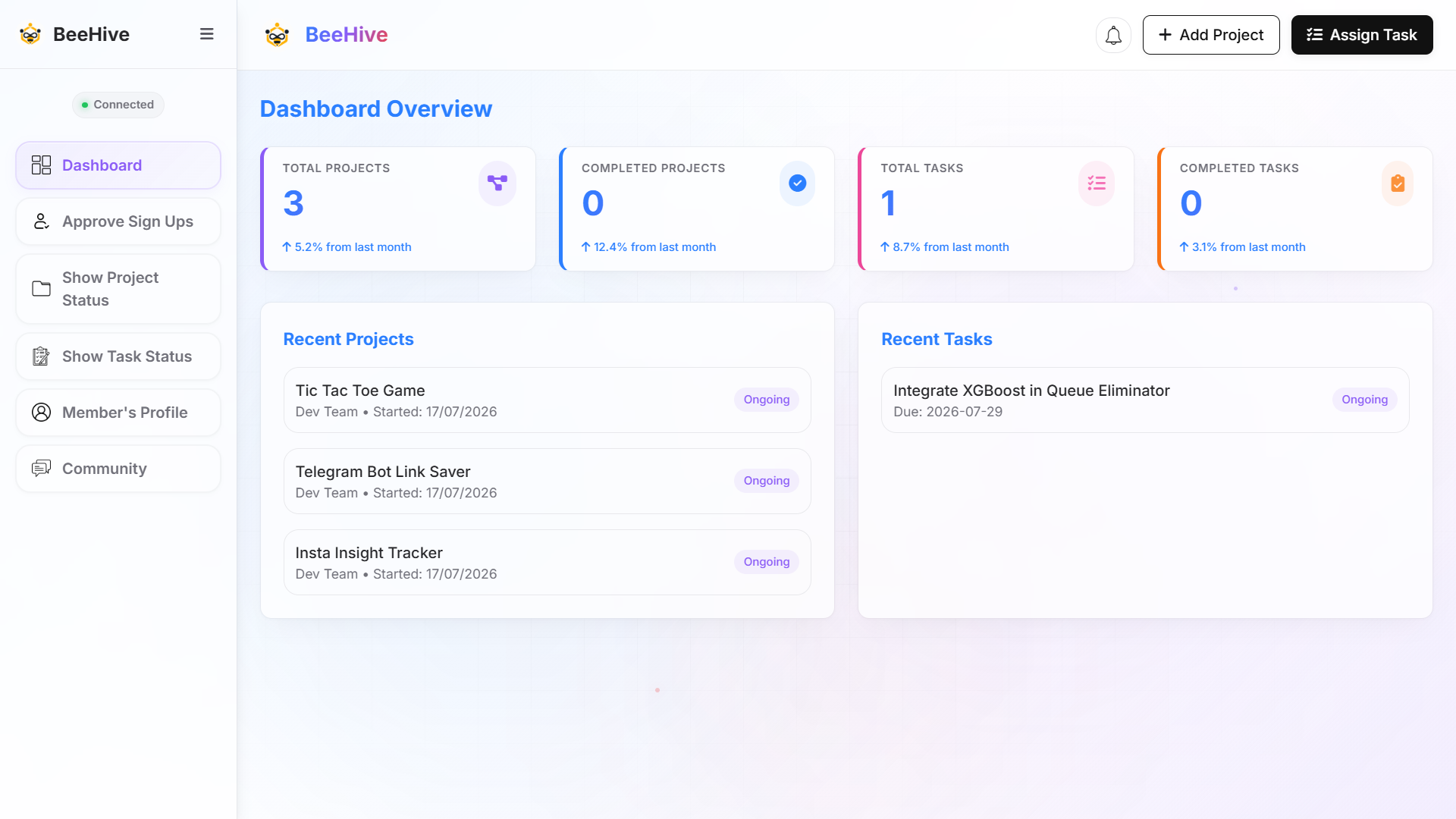
The dashboard provides a concise overview of the most important project metrics. It displays the total number of projects and tasks, along with the number of completed projects and tasks. Additionally, it highlights the most recently created projects and tasks, allowing admin to quickly track ongoing work and recent activity.
Members
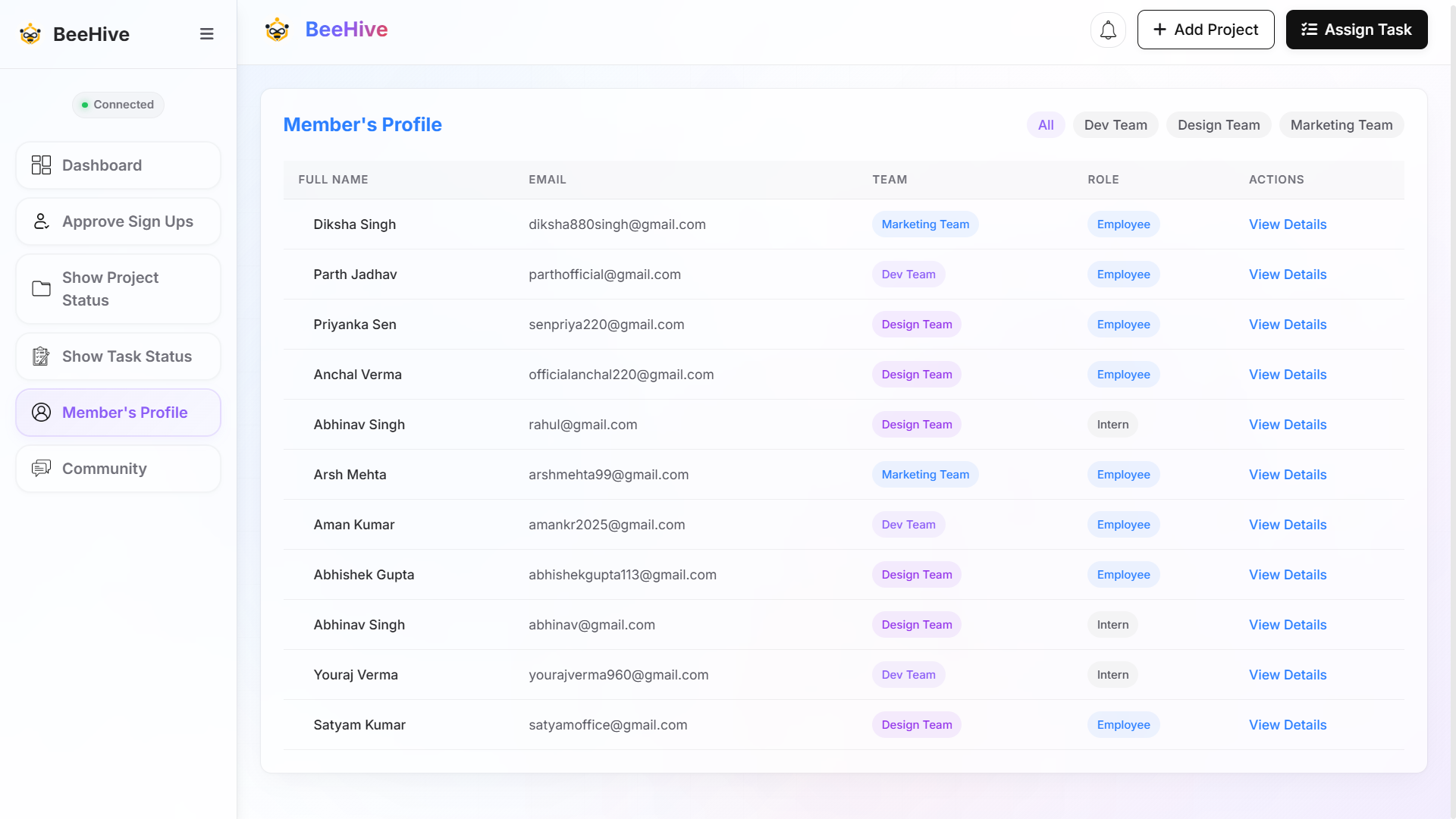
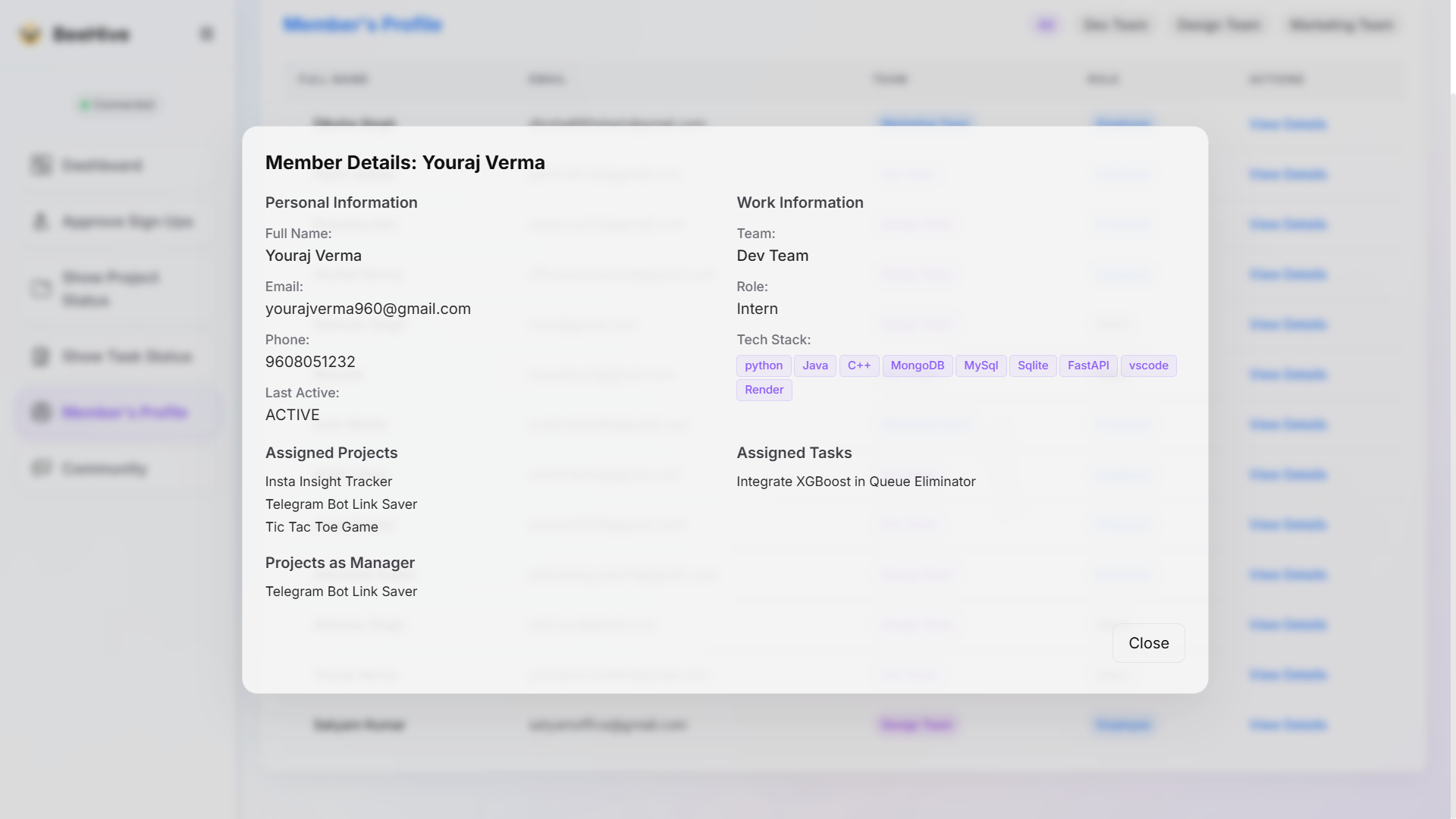
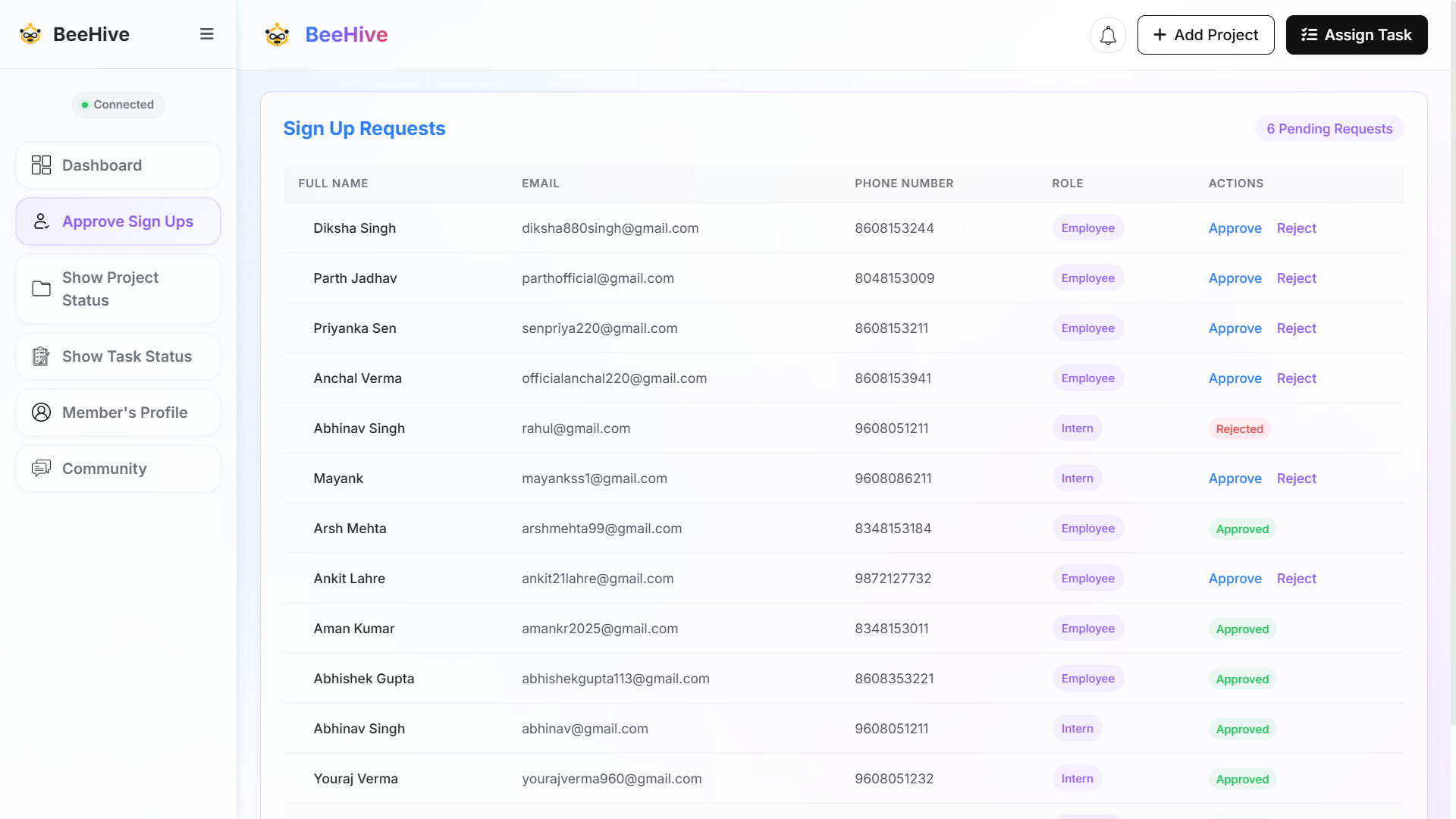
The Members section provides a comprehensive view of everyone in your organization. You can filter members by team to quickly find the people you're looking for. Click on View Details to access a member's complete profile, including their role, team, and other relevant information. Additionally, administrators can review and approve or reject requests from users who wish to join the organization, ensuring secure and controlled team management.
Projects
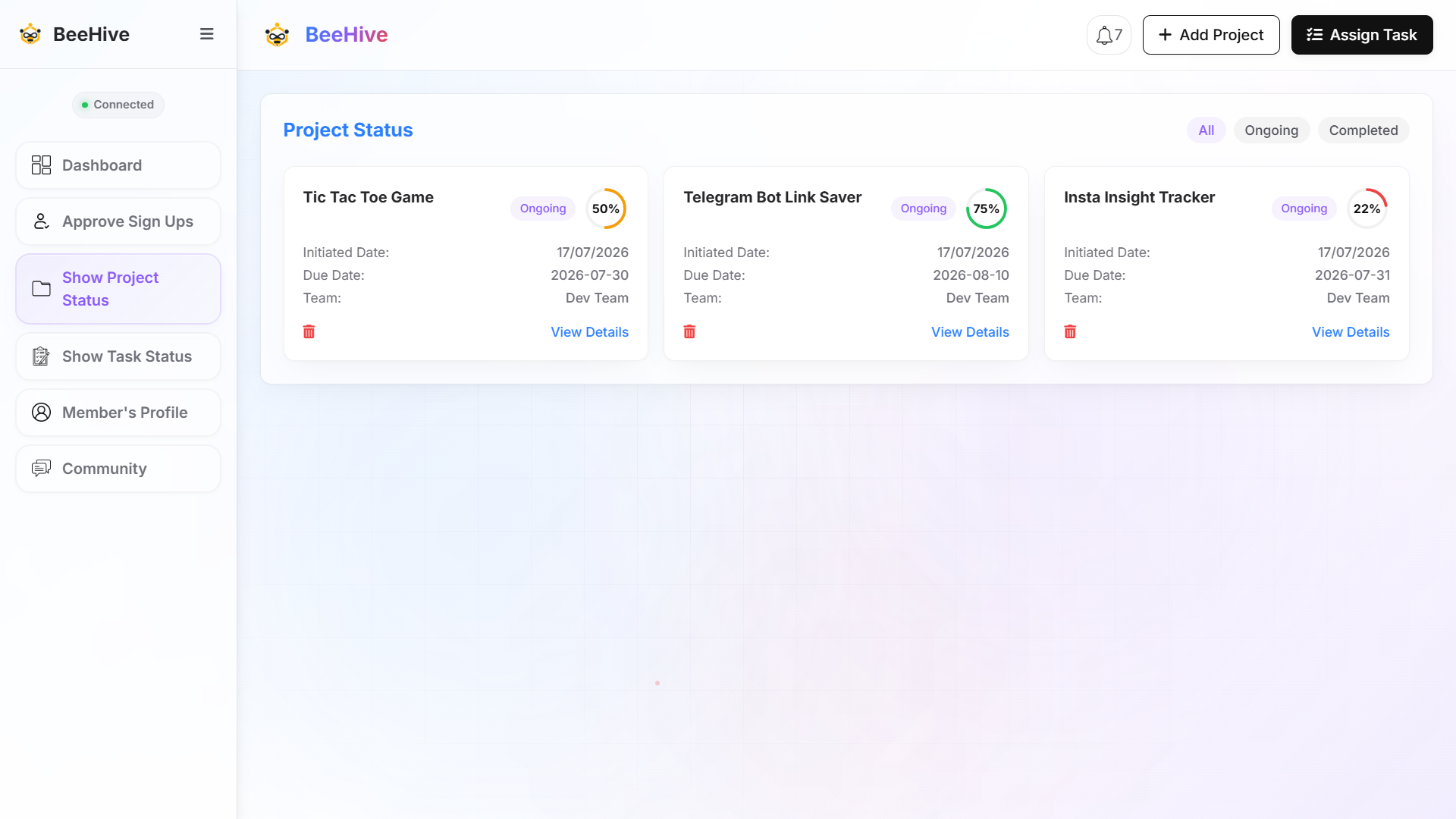
The Projects section provides a clear overview of all ongoing and completed projects. You can easily filter projects by their status to focus on active or completed work. Each project displays its completion percentage, allowing you to monitor progress at a glance. Click on View Details to access comprehensive project information, including tasks, team members, and milestones. Administrators also have the ability to delete projects when they are no longer needed.
Tasks
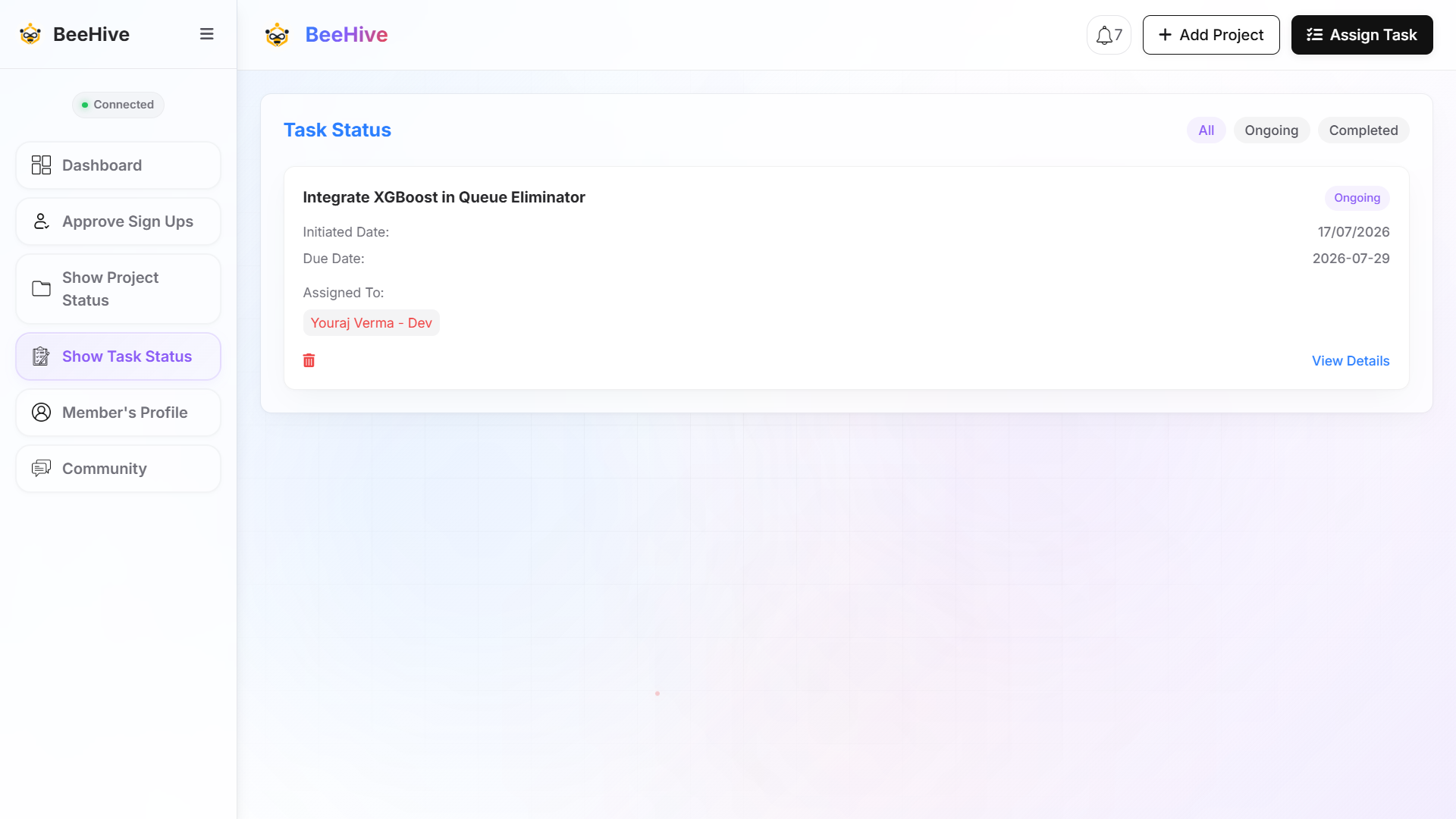
The Tasks section functions similarly to the Projects section but is designed for managing smaller, individual pieces of work. You can create, assign, and track tasks for specific team members without the overhead of creating a full project. Each task includes progress tracking, status updates, and detailed information, making it easy to manage day-to-day work efficiently.
Notification
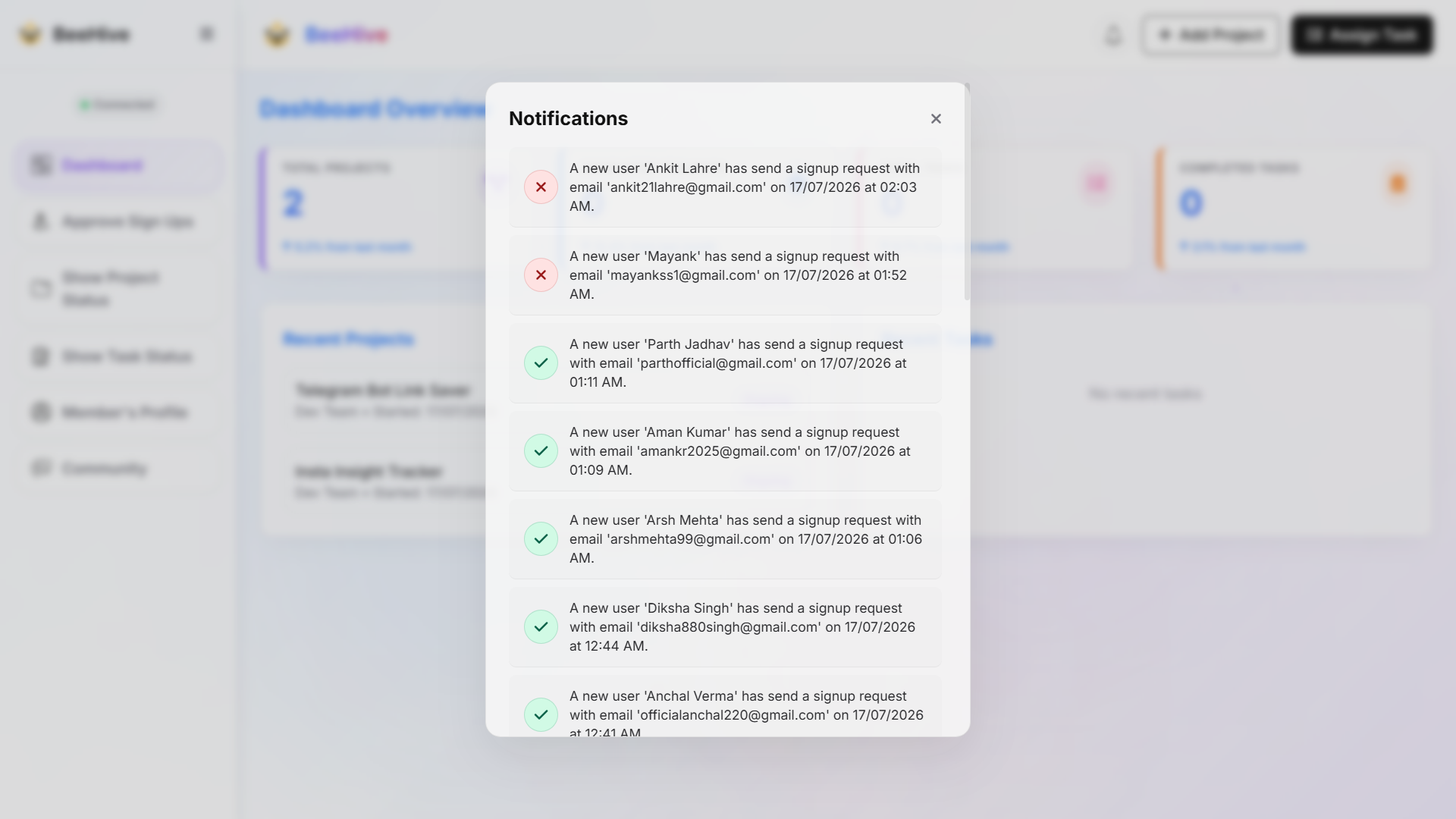
The Notification Center keeps administrators informed about important activities across the organization. It provides real-time notifications for key events, such as new member requests, project updates, task assignments, and other significant actions. The screenshot below showcases the different types of notifications available, helping administrators stay updated and respond promptly.
Settings
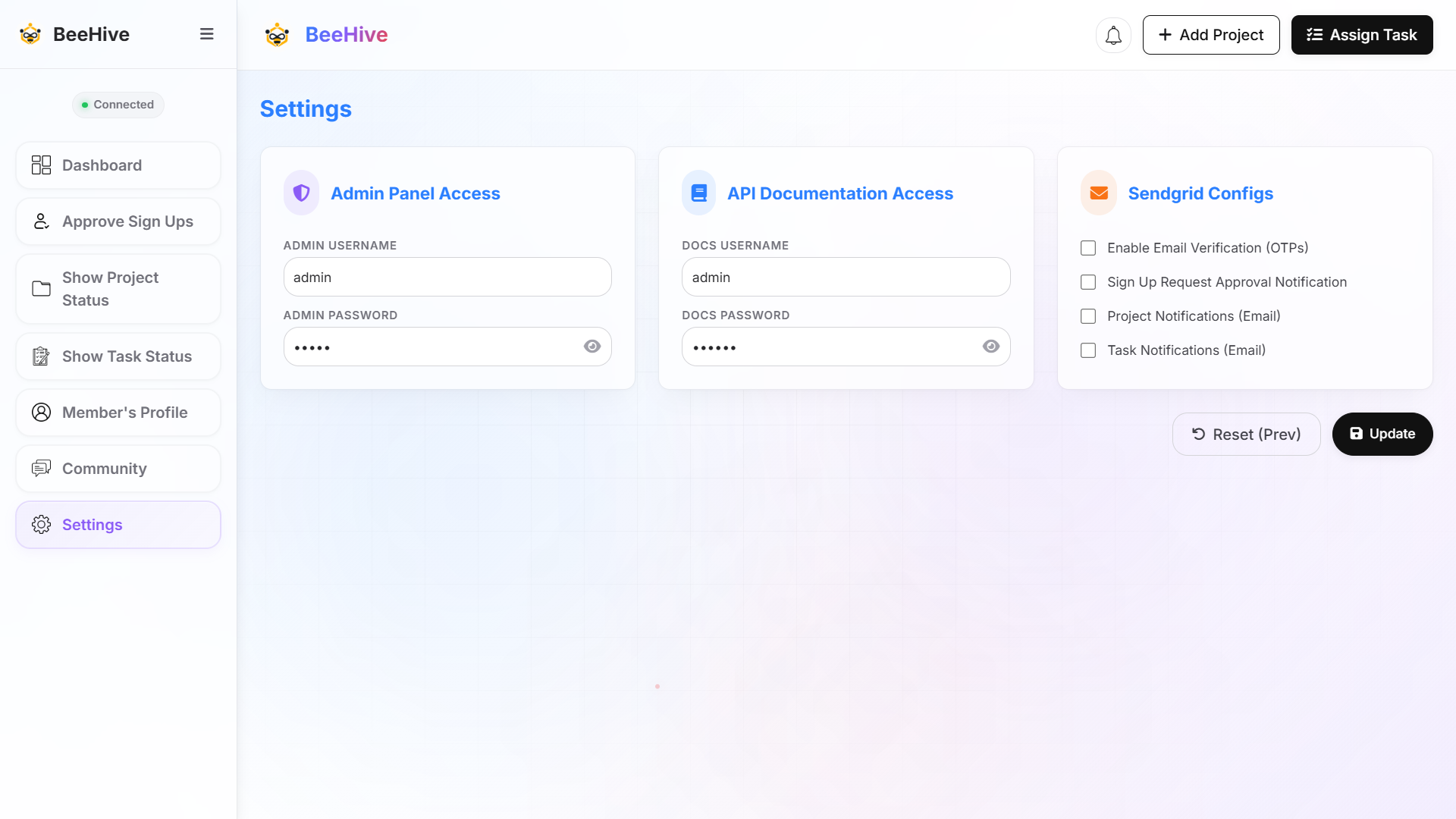
The Settings section provides administrators with centralized control over platform credentials and email notification preferences. You can configure and update credentials for Admin Panel Access and API Documentation Access, as well as toggle Sendgrid configurations for email verification (OTPs), sign-up request approval notifications, project notifications, and task notifications.
Community
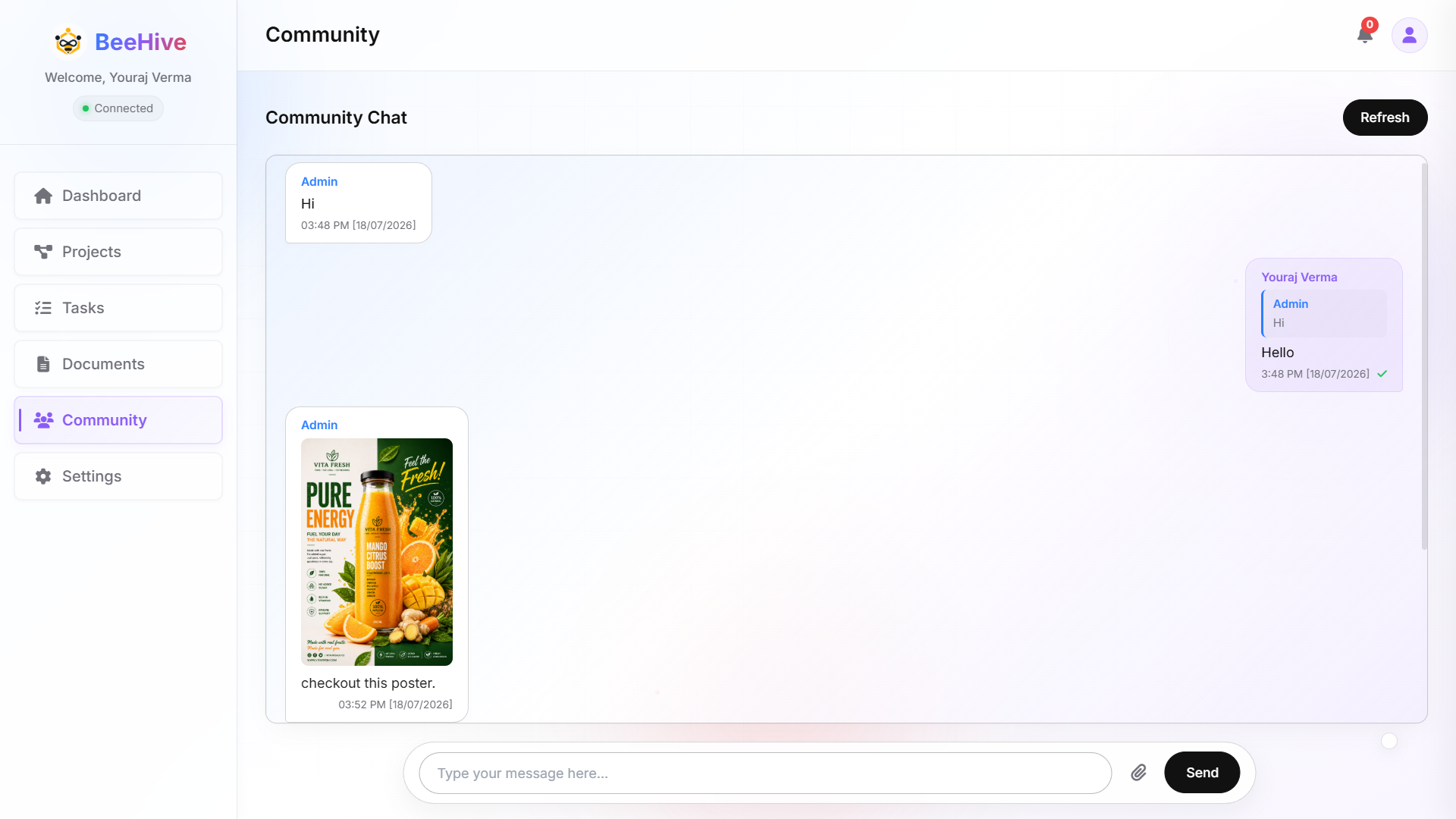
The Community section is designed to foster collaboration and engagement among team members. Members can share updates, reply to messages, and react with emojis to encourage meaningful discussions. To maintain a healthy and organized environment, administrators have the authority to delete messages for everyone whenever necessary.
User Guide
Dashboard
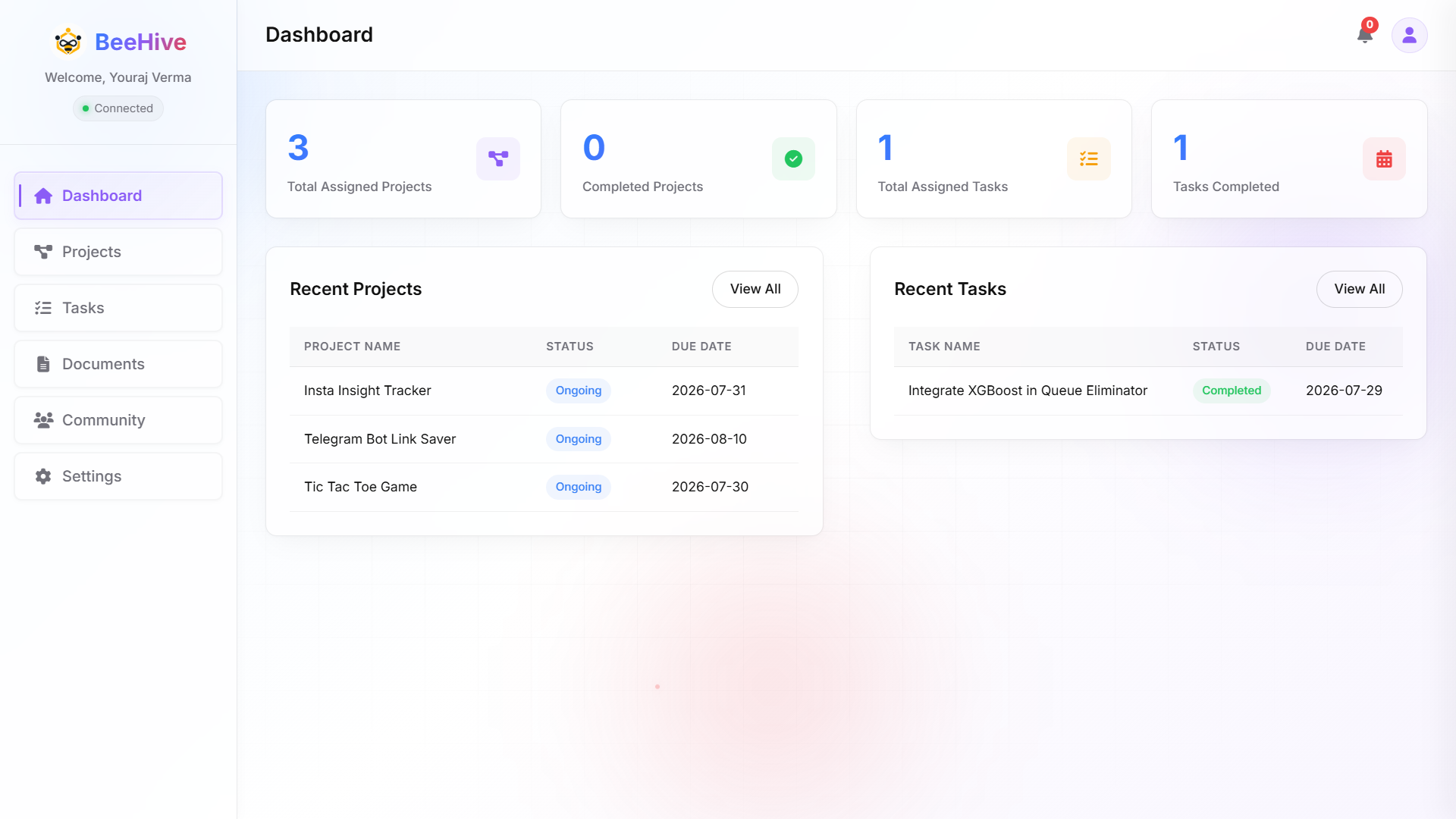
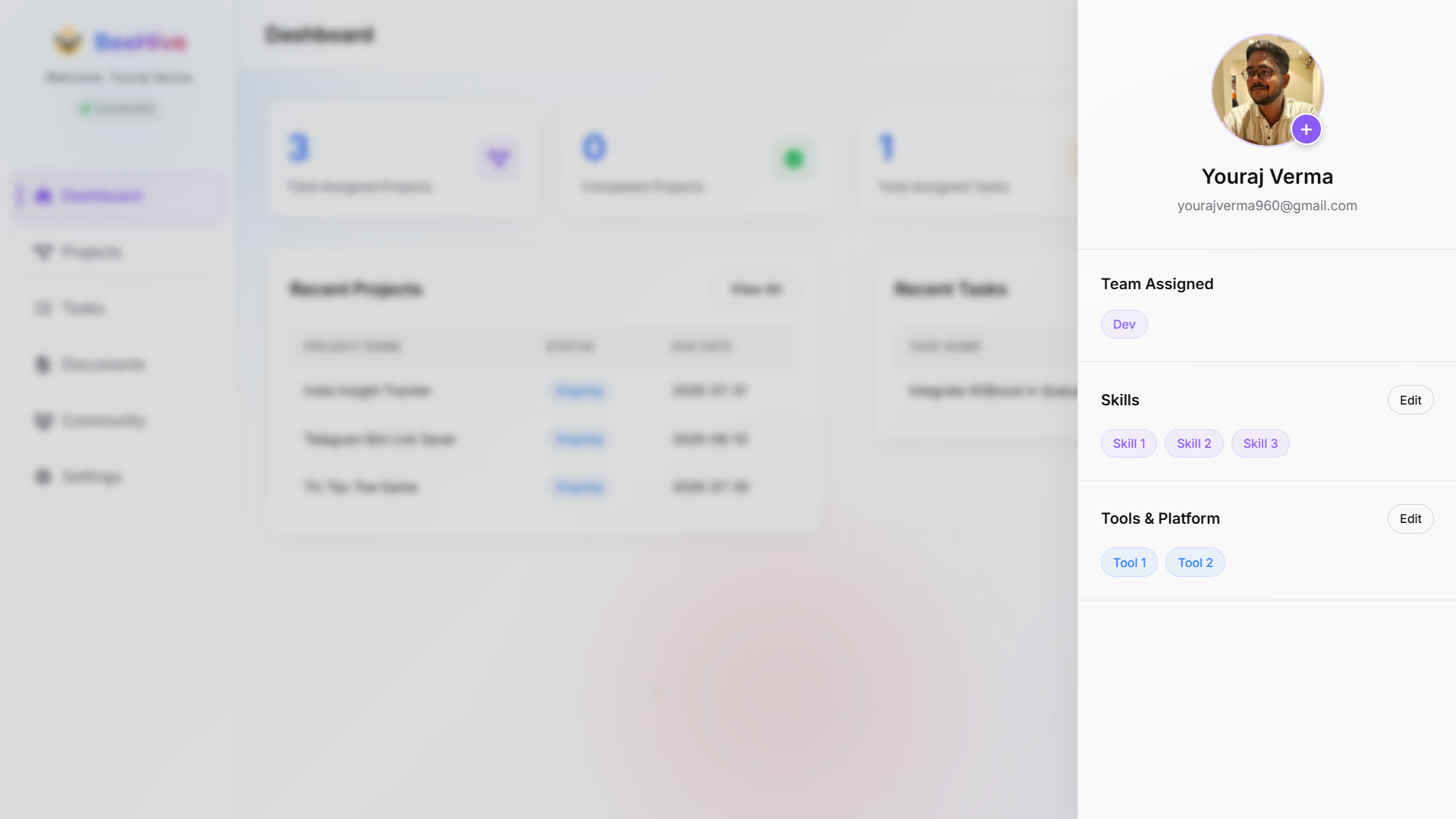
The User Dashboard is similar to the Admin Dashboard. It displays the total number of projects and tasks assigned to the user, along with the number that have been completed. The dashboard also shows the most recently assigned projects and tasks. Moreover, users can update their profile and keep their skills inventory up to date.
Projects
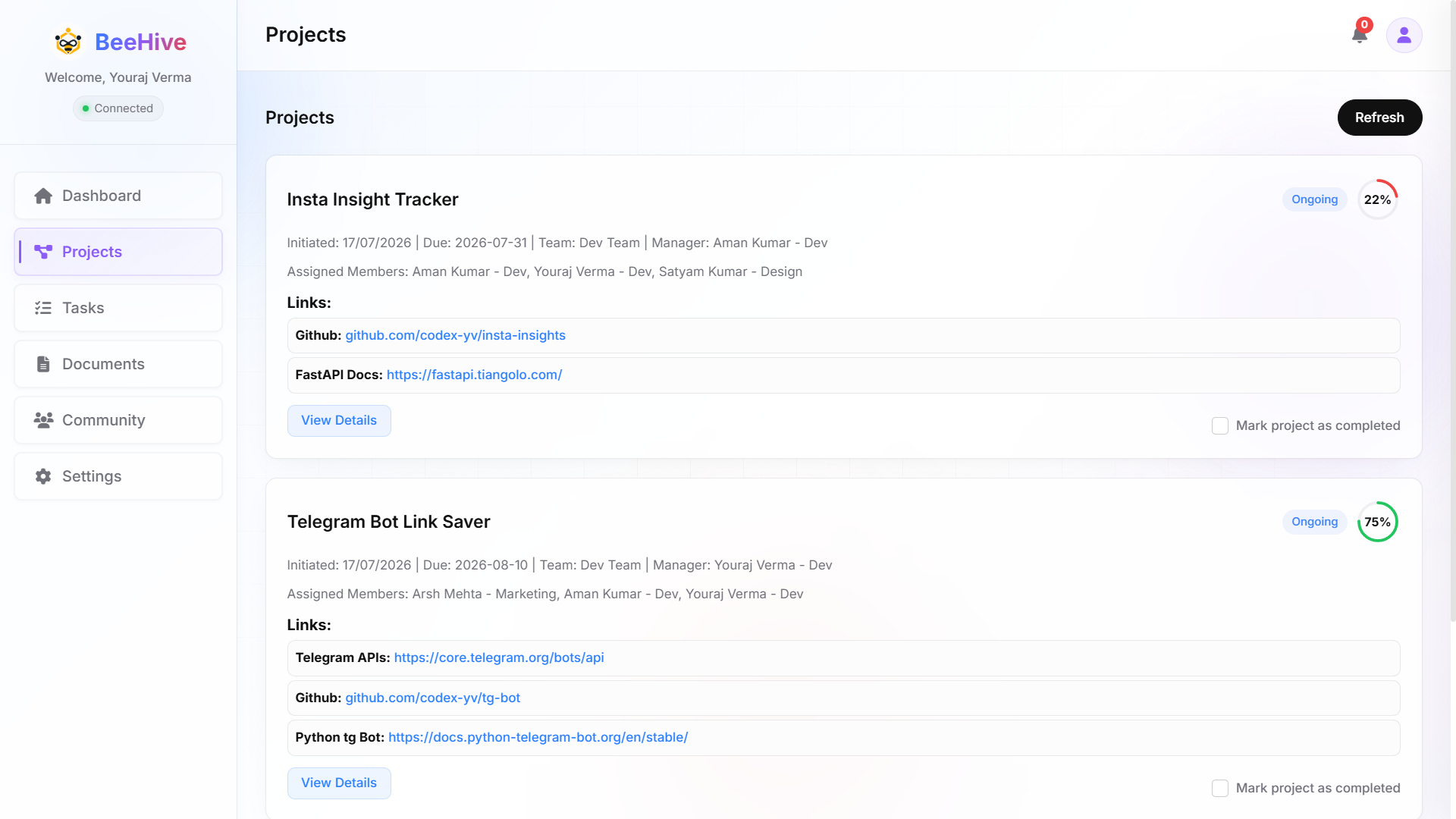
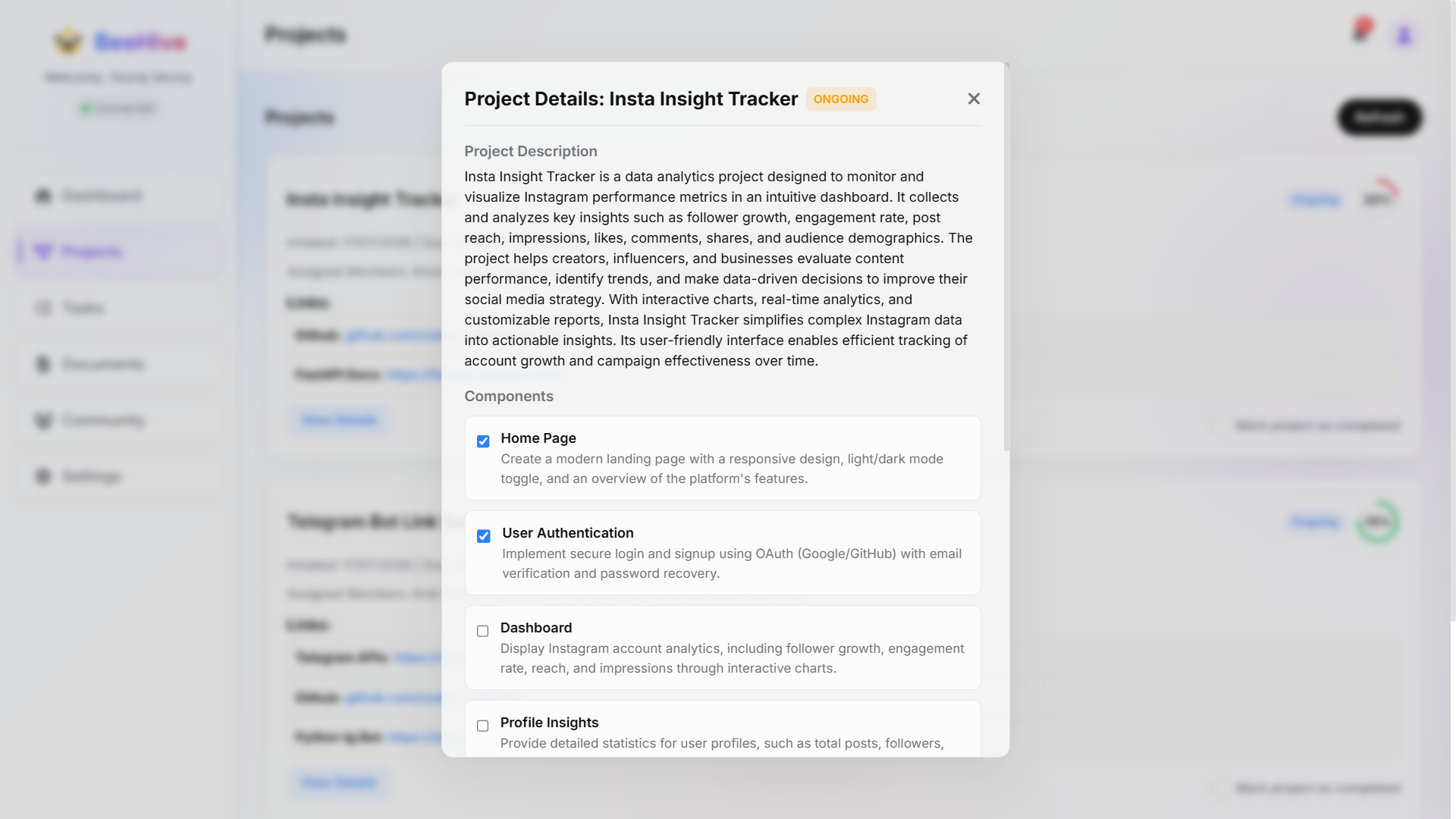
The Projects section displays all projects assigned to the user, along with key details in each project card. For additional information and available actions, click on View Details. This opens the project's description and its associated components, each with a checkbox. Users can mark individual components as completed as they finish them. Selecting Mark Project as Completed automatically marks all project components as completed.
Tasks
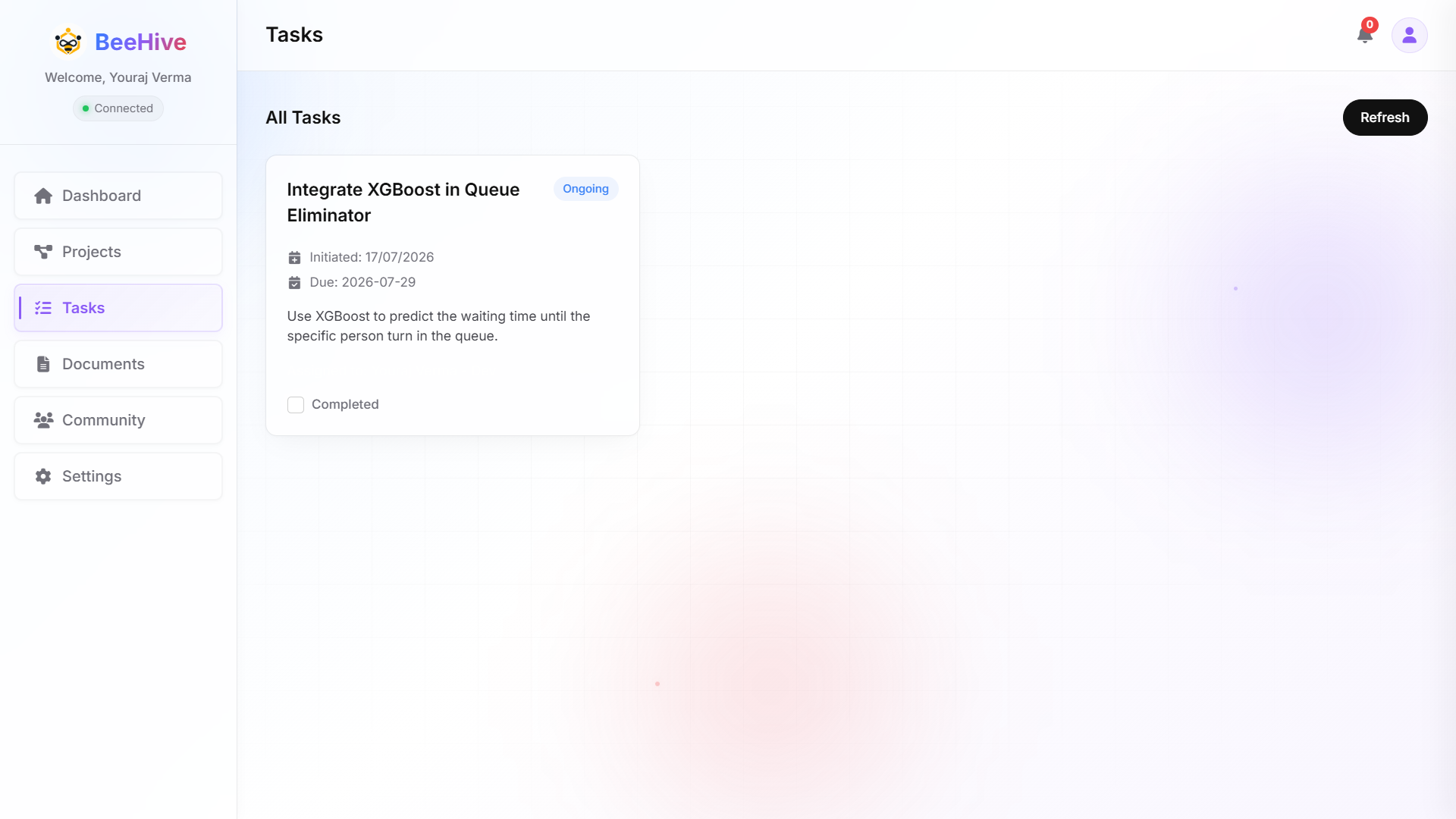
The Tasks section displays all tasks assigned to the user. The task details are presented in a simple and concise format, providing only the essential information for quick understanding and efficient task management.
Notification
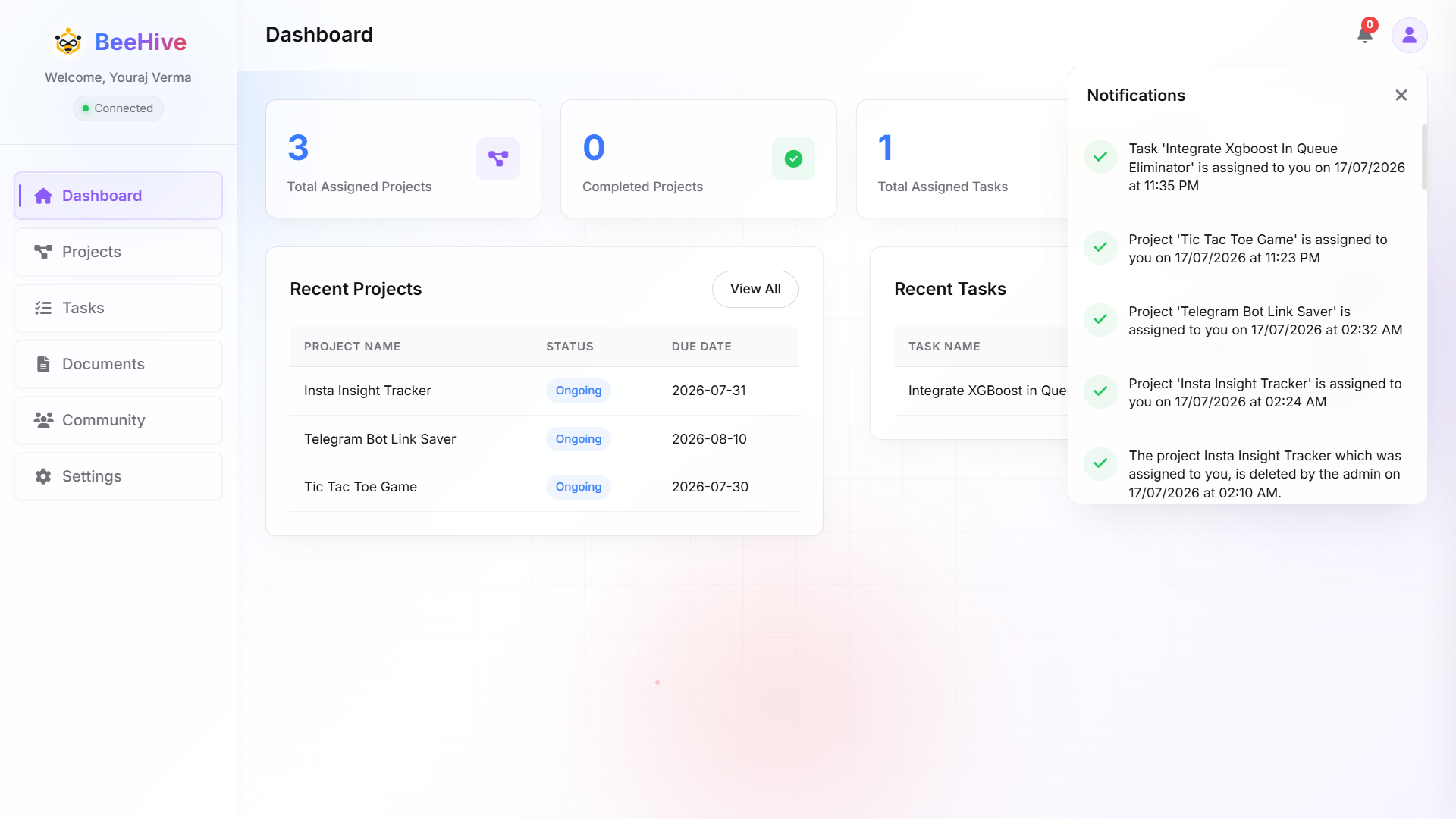
The Notifications section helps users stay informed about activities initiated by the administrator. It ensures that users do not miss any important updates and keeps them informed about the latest actions relevant to them.
Community
The Community section in the User Workspace serves the same purpose as it does in the Admin Workspace. Users can chat with team members, reply to messages, react with emojis, and delete their own messages. They can also share images to make their messages more descriptive and easier to understand.
Developer Guide
Folder Structure
beehive/
├── main.py                    # FastAPI application entry point
├── templates_jinja.py         # Jinja2 template setup & configuration
├── requirements.txt           # Python backend dependencies
├── README.md                  # Project documentation & overview
├── .env                       # Environment variables (Database URL, API keys)
│
├── app/                       # FastAPI application module
│   ├── rtc.py                 # Real-time WebSocket communication handler
│   ├── routes/                # Backend API & page routes
│   │   ├── community.py       # Community chat & messaging API
│   │   ├── admin/             # Administrator routes
│   │   │   ├── dashboard.py   # Admin metrics & analytics
│   │   │   ├── pendings.py    # Registration approval requests
│   │   │   ├── profiles.py    # User profile management
│   │   │   ├── projects.py    # Project CRUD operations
│   │   │   └── tasks.py       # Global task assignments
│   │   └── clients/           # Client/Member routes
│   │       ├── dashboard.py   # Personal dashboard API
│   │       ├── entry.py       # Authentication & onboarding
│   │       ├── projects.py    # Member project tracking
│   │       └── tasks.py       # Member task updates
│   ├── static/                # Static assets (CSS, JS, images for Jinja UI)
│   └── templates/             # Jinja2 HTML templates
│       ├── home.html          # Main landing template
│       ├── admin/             # Admin workspace views
│       └── clients/           # Client workspace views
│
├── configs/                   # Application configurations
│   ├── trendyDB.py            # MongoDB client & database configuration
│   ├── cloudinary_config.py   # Image upload configuration
│   ├── access_configs.py     # Authentication tokens config
│   ├── devConfig.py           # Developer debug settings
│   └── otp_configs.py         # OTP & email verification settings
│
├── schemas/                   # Pydantic data validation schemas
│   ├── adminProjectSchemas.py # Admin project payload validation
│   ├── adminTasksSchemas.py   # Admin task payload validation
│   ├── loginSchemas.py        # Auth & login schemas
│   ├── messageSystemSchemas.py# Chat message schemas
│   ├── updatePjtSchemas.py    # Project update schemas
│   └── updateTskSchema.py     # Task update schemas
│
├── security/                  # Security & Encryption utilities
│   ├── encryptPass.py         # Password hashing logic
│   └── decryptPass.py         # Password verification logic
│
└── utils/                     # Backend helper functions & business logic
    ├── adminGets.py           # Database fetching helpers for admin
    ├── adminPosts.py          # Database creation helpers for admin
    ├── adminPuts.py           # Database update helpers for admin
    ├── clientGets.py          # Member fetching helpers
    ├── clientPost.py          # Member creation helpers
    ├── clientPuts.py          # Member update helpers
    ├── general.py             # General utility routines
    ├── IST.py                 # Timezone & date utilities
    └── messageSystem.py       # Real-time message dispatching helpers
API Reference
Database Schema
Environment Variables
# Database Configuration
MONGO_URI="mongodb+srv://<username>:<password>@<cluster-name>.<cluster-id>.mongodb.net/<database-name>?retryWrites=true&w=majority"

# Email Service (SendGrid)
SENDGRID_API_KEY="SG.your_sendgrid_api_key_here"
EMAIL="notifications@yourdomain.com"

# Cloud Storage (Cloudinary)
CLOUD_NAME="your_cloudinary_cloud_name"
CLOUDINARY_API_KEY="123456789012345"
CLOUDINARY_SECRET_KEY="your_cloudinary_secret_key

PYTHON_VERSION = "3.10.13"
Contributing
Deployment
To get started with BeeHive, you'll need to set up the environment and install dependencies.
Reference
FAQ
Is BeeHive really free and open source?
Yes. BeeHive is MIT licensed. You can read, fork, modify, and self-host it forever, at no cost.
Where does my data live?
Wherever you deploy it. BeeHive runs on your own infrastructure or Render, Vercel, AWS etc.
Do I need to be a developer to run it?
No. You don't need to be a developer, simply follow the setup instructions to get started.
Does BeeHive support real-time updates?
Yes. Presence, task updates, and chat are all real-time out of the box.
Can I customize or extend BeeHive?
Absolutely. The codebase is modular. Replace, extend, or theme any part of it.
How does it compare to hosted tools?
You get similar functionality without vendor lock-in, subscription fees, or data risk.
Troubleshooting
Changelog
Roadmap
License
BeeHive is open-source software licensed under the MIT License.
MIT License

Copyright (c) 2026 BeeHive Contributors

Permission is hereby granted, free of charge, to any person obtaining a copy
of this software and associated documentation files (the "Software"), to deal
in the Software without restriction, including without limitation the rights
to use, copy, modify, merge, publish, distribute, sublicense, and/or sell
copies of the Software, and to permit persons to whom the Software is
furnished to do so, subject to the following conditions:

The above copyright notice and this permission notice shall be included in all
copies or substantial portions of the Software.

THE SOFTWARE IS PROVIDED "AS IS", WITHOUT WARRANTY OF ANY KIND, EXPRESS OR
IMPLIED, INCLUDING BUT NOT LIMITED TO THE WARRANTIES OF MERCHANTABILITY,
FITNESS FOR A PARTICULAR PURPOSE AND NONINFRINGEMENT. IN NO EVENT SHALL THE
AUTHORS OR COPYRIGHT HOLDERS BE LIABLE FOR ANY CLAIM, DAMAGES OR OTHER
LIABILITY, WHETHER IN AN ACTION OF CONTRACT, TORT OR OTHERWISE, ARISING FROM,
OUT OF OR IN CONNECTION WITH THE SOFTWARE OR THE USE OR OTHER DEALINGS IN THE
SOFTWARE.